Introduction to Galadril
Welcome to the technical documentation for Galadril.
Galadril is a scalable, configuration-driven platform designed to ingest heterogeneous data, such as documents, financial logs, and OSINT, and process it through high-performance, custom machine learning pipelines.
Core Philosophy
- Configuration-Driven: Orchestrate your entire system via a single
pipeline.yamlfile for maximum reproducibility. - Event-Driven Architecture: High-throughput communication between components is handled natively via Apache Kafka.
Prerequisites
To effectively build with Galadril, you should be familiar with the following core technologies:
| Technology | Purpose in Galadril |
|---|---|
| YAML | Pipeline config for services. |
| Python | Custom ML models (JAX, PyTorch, etc.) via galadril-vision. |
| Avro | Data schemas and service interoperability. |
TIP: Since these are industry-standard languages, LLMs have excellent support for them. If you run into schema issues or need boilerplate code, use them to speed up your workflow.
License
Source code and documentation are released under the MPL-2.0 license.
Pipeline Configuration
Connector
connectors defines infrastructure credentials for external services.
name: connector_example

connectors:
  # Streaming ingestion for incoming events.
  kafka:
    brokers: ["redpanda:9092"]
    schema_registry: "http://redpanda:8081"
    consumer_group: "intake-service"

  # Storage for processed raw documents.
  s3:
    endpoint: "http://minio:9000"
    access_key: "minioadmin"
    secret_key: "minioadmin"
    region: "us-east-1"
    bucket_notifications: "s3-bucket-notifications"

  # Persistent storage.
  postgres:
    database: "galadril_dev"
    host: "postgres:5432"
    user: "postgres"
    password: "postgres"
(This example relies on Docker network.)
1. Kafka Connector
- brokers: A list of bootstrap servers (e.g., Redpanda or Apache Kafka).
- schema_registry: The URL for the Confluent-compatible schema management service for managing data formats.
- consumer_group: The logical identifier that allows multiple workers to share the processing load of a topic.
2. S3 (Object Storage) Connector
Used for storing and retrieving large binary objects like images, videos, or model weights.
- endpoint: The API entry point. This allows for compatibility between local solutions like MinIO and cloud providers like AWS.
- access_key / secret_key: The credentials required for secure authentication.
- bucket_notifications: Defines the specific topic or queue where bucket events (like “Object Created”) are published.
3. Postgres Connector
Manages relational data, system state, and metadata.
- host: The network address and port of the database instance.
- database: The specific database name for the application environment.
- user / password: The credentials used to establish a secure database session.
Data Sources & Routing
sources defines how raw files in S3 are caught and routed into Kafka.
sources:
  - id: image_source
    match_pattern: "^images/" # support Regexes!
    topic: raw_images
    schema_path: schemas/avro/image.avsc
Definition Fields
| Field | Type | Description |
|---|---|---|
id | String | Unique identifier for this source. |
topic | String | Kafka topic where parsed data will be sent. |
schema_path | String | (Optional) Local path to an .avsc Avro schema. |
match_pattern | String | (Optional) Regex to identify where to stream. |
parser | String | See Data Parsers. |
How Routing Works
When a file arrives in S3 (e.g., s3://my-bucket/finance/january.csv),
the Rust Ingestor must decide which source block to use.
1. Regex Matching (match_pattern)
If you define match_pattern: "^finance/.*\.csv$", the system will test the S3
key against this regex. If it matches, this source is selected.
2. Otherwise
If no match_pattern is defined, the system will reject the incoming source,
and won’t process the raw data.
Required & Reserved Fields
While Avro is flexible, Galadril’s internal logic (especially the Python Vision service) expects specific fields to be present in the schema to properly link data back to its origin.
1. Unique Identifiers
Every record must have a unique ID. The system looks for these fields in order of priority to determine the Kafka partitioning key:
event_id(Common for logs/financials)image_id(For satellite/photos)document_id(For PDFs/Docs)article_id(For OSINT/News)
2. Traceability Fields
To ensure the Python pipeline can download binary content, the following field
is mandatory for metadata parsers:
storage_path(String): The full S3 URI.
Data Parsers
Once a file is routed to a source, the parser dictates how the file’s content
is transformed before entering Kafka.
1. The metadata Parser (Default)
- Behavior: Does not download the file. It generates a standard JSON payload containing the S3 URI, timestamps, and generated UUIDs.
- Use Case: Images, Videos, PDFs. You don’t want 50MB images flowing through Kafka. You pass the reference (URI), and the Python Vision service will download it later.
2. The csv Parser
- Behavior: Downloads the file from S3 and parses it line by line using the CSV headers. It emits one Kafka message per row. It automatically converts numerical strings to floats.
- Use Case: Batch ingestion of financial transactions, lists of employees, or sensor logs.
3. The json Parser
- Behavior: Downloads the file. If the file contains a JSON Array, it emits one Kafka message per item. If it’s a single JSON Object, it emits one message.
- Use Case: OSINT data, scraped articles, or API data dumps.
Example
sources:
  - id: financial_data
    topic: raw.finance
    parser: csv
    match_pattern: "^finance/.*\\.csv$"
    schema_path: schemas/avro/finance.avsc
Pipeline (Steps)
pipeline defines a DAG for processing. It connects data sources to ML models,
and ML models to other ML models.
Step Definition
| Field | Description |
|---|---|
step | Unique name for this processing node (e.g., face_detection). |
type | Usually inference for Galadril. |
model | The fully qualified Python class path. |
artifact_path | Where the model weights are stored on S3. |
input_from | Array of IDs. Defines the dependencies of this step. |
params | Key-Value pairs passed to the model’s constructor. |
Understanding input_from
The input_from array is the most important field. It tells the Python
orchestrator where to get the data for this step.
You can reference:
- A Source ID: To process raw data directly from Kafka.
- Another Step ID: To chain models together.
Example: Chaining Models
In this example, the Face Recognition model waits for raw images, and the Database Storage step waits for the Face Recognition step to finish.
pipeline:
  # Step 1: Detect faces from raw images
  - step: face_detection
    type: inference
    model: my_models.FaceRecognition
    input_from: [image_source] # References a Source ID
    params:
      threshold: 0.85

  # Step 2: Store results in the database
  - step: database_sink
    type: storage
    model: my_models.PostgresSink
    input_from: [face_detection] # References the previous Step ID
Models
Models
The system supports several pre-trained models out of the box. These can be
referenced using their respective _MODEL_NAME identifiers.
| Model Name | Description | Research Paper |
|---|---|---|
| bge_m3 | Embedding for semantic and multi-vector search. | Arxiv |
| face_recognition | Face analysis and identification via InsightFace (Buffalo). | |
| got_ocr | Unified visual text processing with GOT-OCR 2.0. | Arxiv |
| grounded_sam | Zero-shot object detection and segmentation (Grounded-SAM). | Arxiv |
| owlv2 | Open-world object detection and localization. | Arxiv |
| siglip2 | Advanced vision-language model for image-text understanding. | Arxiv |
| timesfm_forecast | Time-series foundation model for versatile forecasting. | Arxiv |
| whisper | Multilingual speech-to-text with diarization and embeddings. | Arxiv |
Model Details
1. BGE-M3 (bge_m3)
Versatile embedding model that supports multi-functionality, multi-linguality, and multi-granularity. It performs simultaneous dense, sparse (lexical), and multi-vector (ColBERT) retrieval.
- Inputs:
text(Required): The string content to be embedded.
- Outputs:
dense: A high-dimensional vector for semantic similarity.sparse: A dictionary of token weights for lexical/keyword matching.colbert: A multi-vector representation for fine-grained late interaction scoring.
2. Face Recognition (face_recognition)
Performs facial detection, alignment, and embedding extraction.
- Inputs:
action(Required): The inference action to perform (fromFaceAction).image(Required): BGR image as numpy array(H, W, 3).
- Outputs:
faces_count: Number of detected faces.faces: List of objects containingbbox,keypoints,confidence, and the 512-dembedding.
3. GOT OCR (got_ocr)
General Object Role-playing OCR for high-quality text extraction.
- Inputs:
image/images: Single ndarray or list of images.action: Specific OCR task (fromGotOcrAction).format: Boolean (defaultTrue) to maintain formatting.box: Optional crop area[x1, y1, x2, y2].
- Outputs:
text: The extracted string content.
4. Grounded SAM (grounded_sam)
Combines language understanding with precise image segmentation.
- Inputs:
image&text(Required): The source image and the prompt to segment.threshold: Detection confidence (default0.2).return_masks: Whether to return the binary segmentation masks.- Note: Supports tiling for high-resolution images via
use_tiling.
- Outputs:
total_objects: Count of all detected instances.concepts: Dictionary mapped by label containingbox,score, and optionallymask.
5. OWLv2 (owlv2)
Open-world localized vocabulary object detection.
- Inputs:
image&text(Required): Image and query labels.threshold: Detection sensitivity (default0.1).
- Outputs:
concepts: Detailed instances per label withboxandscore.
6. SigLIP 2 (siglip2)
State-of-the-art vision-language model for creating shared embeddings.
- Inputs:
action(Required):embed_imageorembed_text.image: Required for image embedding.text: Required for text embedding.
- Outputs:
embedding: Vector representation.embedding_dim: Size of the vector.
7. TimesFM Forecast (timesfm_forecast)
Foundation model for time-series forecasting with external covariates.
- Inputs:
history(Required): List of numerical historical values.horizon: Number of future steps to predict (default24).dynamic_numerical_covariates: Optional dict for external regressors.
- Outputs:
point_forecast: The predicted mean values.quantiles: Deciles (0.1 to 0.9) for uncertainty estimation.
8. Whisper (whisper)
Multilingual speech-to-text with advanced speaker diarization.
- Inputs:
audio(Required): Dict containingwaveform(ndarray) andsample_rate.task:transcribeortranslate(defaulttranscribe).language: Optional ISO language code.enable_diarization: Boolean to trigger speaker clustering and embeddings.
- Outputs:
text: Full transcript string.chunks: Segments withtimestamp,text,speaker, andspeaker_embedding.language: Detected or used language.
Galadril Studio
Studio is a service designed to visualize data analyzed and retrieved by Galadril. Unlike the pipeline, which is configured using YAML, Studio is configured via a user interface.
Since data and user requirements vary, customization is key. Instead of providing fixed dashboards, Galadriel offers a suite of premade components, allowing you to assemble a dashboard that fits your exact needs.
Dashboard Builder
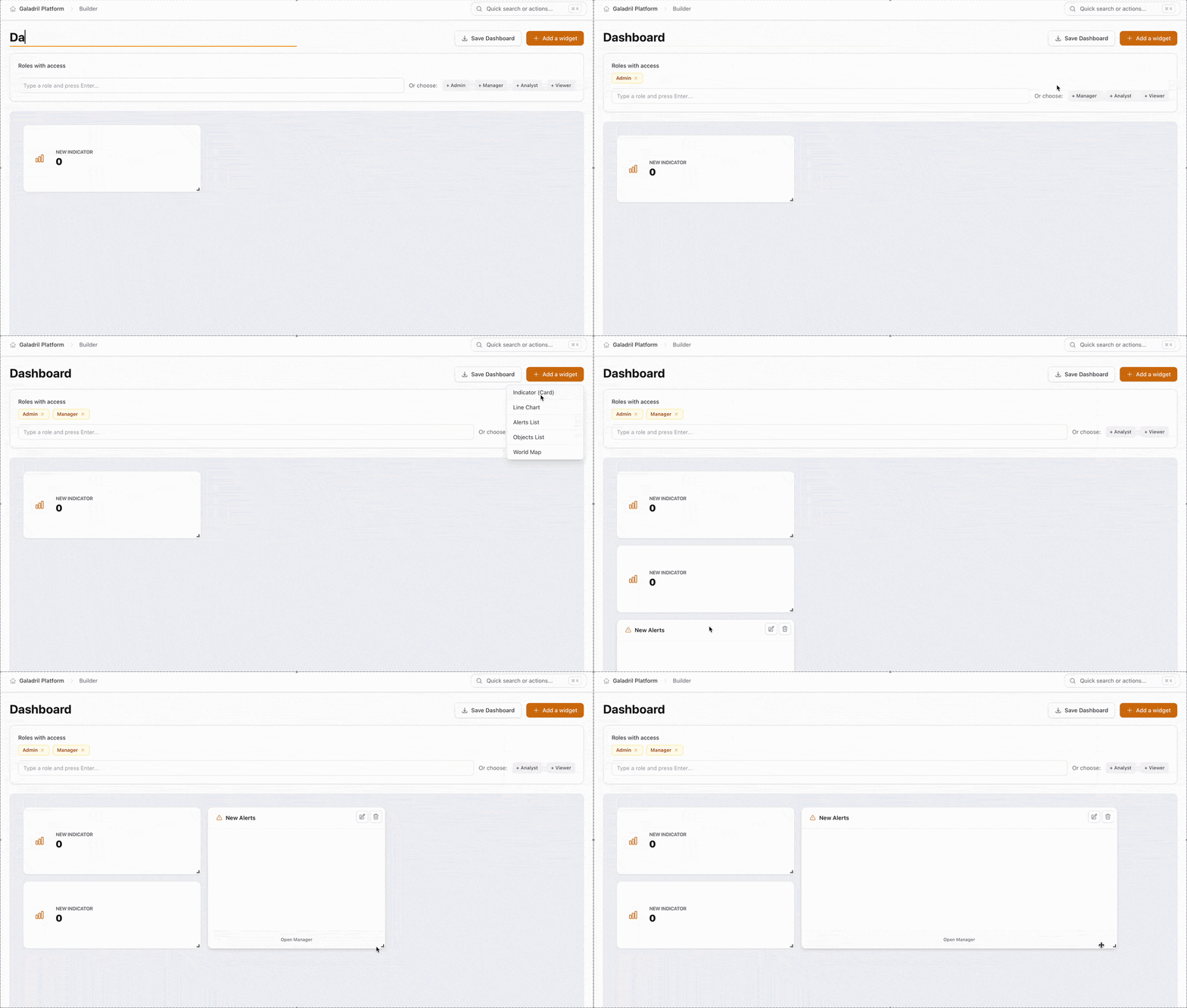
The Dashboard Builder is Galadril’s visual interface for creating monitoring views. It allows you to transform raw model outputs and pipeline metrics into actionable insights through customizable widgets.
Key Components
The builder interface is divided into three primary functional areas:
1. Header & Identity
- Dashboard Name: The top-left field allows you to give your dashboard a unique identifier.
- Action Bar:
- Save Dashboard: Persists your layout and configuration to the Galadril database.
- Add a widget: Opens the widget library to insert new data visualizations.
2. Access Control (RBAC)
The Roles with access section defines which user groups can view or interact with the dashboard. You can configure this in two ways:
- Manual Entry: Type specific role names and press
Enter. - Quick Select: Use the preset tags to instantly assign standard permission levels.
Widget Library
The following widgets can be added via the + Add a widget button to monitor your pipeline:
| Widget | Best Used For |
|---|---|
| World Map | Visualizing geographic distribution of data points or edge device locations. |
| Indicator (Card) | Displaying high-level, single-value metrics like Total Inferences or System Uptime. |
| Line Chart | Tracking performance trends and latency over time. |
| Alerts List | Monitoring a real-time feed of system warnings or model threshold breaches. |
| Objects List | Reviewing granular data records or individual model detection results. |
Internal Architecture
Galadril is divided into three distinct operational layers (Medaillon architecture):
- The Synapse: MinIO (S3) and Redpanda (Kafka).
- The Ingestor: A Rust service that catches raw data and normalizes it.
- The Vision: A Python service that applies AI models and extracts insights.
Intake service
Intake service is a Rust binary located in services/intake/. Its sole
responsibility is ingestion.
Initialization Phase
When the service boots up:
- It reads
pipeline.yaml. - It loops through all defined
sources. - If a source defines an Avro
schema_path, the service registers this schema with the Confluent Schema Registry. - It creates the required Kafka topics if they do not exist.
The Event Loop
The service continuously listens to the S3 bucket notification topic. When a file arrives:
- Routing: It compares the S3 file path against the YAML configuration to find a match.
- Parsing: It dynamically selects the correct parser (e.g., CSV, JSON)
- Emitting: It encodes the parsed data (in Avro or JSON) and publishes it to the designated Kafka topic.
Vision Service
Vision Service is the brain of the platform, located in platform/vision/.
It is dynamically orchestrated by the galadril-pipeline library.
It relies on the galadril-inference library to standardize calls to ML
algorithms.
TODO: explain how to extend galadril-inference and galadril-vision.
DAG Construction
Service builds a DAG from the pipeline.yaml file.
- It validates that no circular dependencies exist.
- It calculates the exact topological order required to execute models.
Dynamic Model Loading
Models are not hardcoded. Service uses Python’s importlib to instantiate the
exact classes defined in the configuration.
Model weights are automatically pulled from S3 into memory before processing
begins.
Message Routing Loop
- The service polls batches of messages from Kafka.
- It identifies the origin (
source_id). - It asks the DAG: “Which model steps require this source as input?”
- It passes the data to the model.
- Once the model outputs a prediction, the service asks the DAG: “Who needs this output next?”
- If no one needs it, the data has reached the end of the pipeline (a Sink).
Data Sinks
When data reaches the end of Python pipeline DAG, it is saved into PostgreSQL. Galadril uses two extensions to handle AI outputs.
1. Apache AGE (Graph Storage)
We use Apache AGE to store:
- Vertices: People, Bank Accounts, Documents.
- Edges: Relationships like
APPEARS_WITH(Person A in Image B) orTRANSACTED_WITH(Account A sent money to Account B).
2. pgvectorscale (Embedding Storage)
AI models output embeddings representing faces or text.
We use pgvectorscale to store these arrays and perform blazing-fast similarity
searches (e.g., finding the closest known face to an unknown detected face
using ORDER BY embedding <=> query_vector).
Eru – ESKG Extraction
eru is a production-ready, agnostic pipeline designed to extract highly
structured Knowledge Graphs (Nodes and Edges) from unstructured text.
Why does it exist?
Extracting knowledge graphs using LLMs alone is flawed: they hallucinate entities, fail to strictly follow JSON schemas, and consume massive amounts of tokens (which is slow and expensive). Conversely, traditional NER (Named Entity Recognition) models extract entities perfectly but cannot understand complex relationships or implicit intents.
Eru bridges this gap. It forces small, fast LLMs to act only as logical routers between physically extracted entities, guaranteeing deterministic, hallucination-free graph extraction.
The 3-Layer Architecture
Eru processes text through a strict, three-step pipeline:
| Layer | Description |
|---|---|
| Extraction | Uses a Bi-encoder (GLiNER) to find physical entities in the text (e.g., Persons, Locations). It automatically deduplicates identical entities. |
| Reasoning | Uses a SLM constrained by outlines. The LLM is forbidden from inventing physical entities; it can only draw relationships using the IDs from Layer 1, or generate implicit conceptual nodes. |
| Validation | A logical gate that prunes mathematically impossible relationships (e.g., a “Car” cannot “Authorize” a “Person”) before the graph is saved to your database. |
Here is a minimal example of how to use Eru to extract a graph from a simple sentence, allowing the model to deduce the implicit intent behind the action.
import json
from typing import Literal
from pydantic import BaseModel, Field
from transformers import AutoModelForCausalLM, AutoTokenizer
import outlines

from eru.engine import EskgEngine
from eru.extractor.gliner import GlinerExtractor
from eru.reasoner.outlines import OutlinesReasoner
from eru.logic.eskg import EskgLogicValidator
from eru.types import RelationDef

# 1. Define your Graph Schema
class Node(BaseModel):
    id: str
    text: str
    type: str

class Edge(BaseModel):
    source_id: str
    target_id: str
    relation_type: Literal["buys", "has_intent"]

class DailyGraph(BaseModel):
    entities: list[Node]
    relations: list[Edge]

def main():
    text = "Alice purchased a Macbook today because she wants to learn coding."

    # Layer 1: Extract explicit physical entities
    extractor = GlinerExtractor(
        labels=["PERSON", "PRODUCT", "TIME"],
        threshold=0.3,
    )

    # Define relationship rules for the LLM
    rules = [
        RelationDef(
            name="buys",
            description="When a person purchases an item.",
            allowed_sources=["PERSON"],
            allowed_targets=["PRODUCT"],
        ),
        RelationDef(
            name="has_intent",
            description="The implicit reason or goal behind the action.",
        )
    ]

    # Layer 2: Setup the SLM Reasoner
    model_name = "Qwen/Qwen2.5-0.5B-Instruct"
    hf_model = AutoModelForCausalLM.from_pretrained(model_name, device_map="auto")
    hf_tokenizer = AutoTokenizer.from_pretrained(model_name)
    llm = outlines.from_transformers(hf_model, hf_tokenizer)

    reasoner = OutlinesReasoner(
        model=llm,
        relation_defs=rules,
        open_entity_types=["INTENT"] # Allow LLM to invent concepts like 'learning to code'
    )

    # Layer 3: Setup the Logic Validator
    validator = EskgLogicValidator(
        get_entities=lambda g: g.entities,
        get_relations=lambda g: g.relations
    )

    # Run the Engine
    engine = EskgEngine(
        schema=DailyGraph,
        extractor=extractor,
        reasoner=reasoner,
        validator=validator
    )
    graph = engine.process(text)

    print(json.dumps(graph.model_dump(), indent=2))

if __name__ == "__main__":
    main()
Expected Output
The engine cleanly separates the physically extracted nodes (Alice, Macbook) from the inferred conceptual node (learning to code).
{
  "entities": [
    {"id": "ent_0", "text": "Alice", "type": "PERSON"},
    {"id": "ent_1", "text": "Macbook", "type": "PRODUCT"}
  ],
  "relations": [
    {
      "source_id": "ent_0",
      "target_id": "ent_1",
      "relation_type": "buys"
    },
    {
      "source_id": "ent_0",
      "target_id": "to learn coding",
      "relation_type": "has_intent"
    }
  ]
}